How to Keep AI Video Ads On Brand
Brand consistency is not a color palette. It is knowing which details can never move, and checking them at the four points where they drift.
To keep an AI video ad on brand, give the team one approved source of truth, decide which details must stay fixed and which can change, and check those details at the storyboard, shot, edit, and final-format stages. Use approved references for people, places, products, and visual style. Treat generated results as drafts, not as proof that a logo, product, or claim is accurate. Models vary, so review every shot before it reaches an audience.
Brand consistency is more than matching a color palette. It means the ad still looks and sounds like the same brand while its story, scenes, and aspect ratios change. A repeatable workflow helps a team spot drift early, when it is cheaper to fix.
Start with an approved brand source pack
Collect the materials the team is allowed to use before writing prompts or generating shots. Keep a named, current version in a place everyone on the project can reach.
Include:
- The approved logo files, product images, packaging artwork, and any required legal marks.
- Brand colors, typography, image references, lighting and composition examples.
- A short voice guide: preferred words, tone, claims the brand can make, and phrases or implications to avoid.
- Product facts, current campaign offer, audience, call to action, and approved proof for performance claims.
- Rights and usage notes for footage, music, likenesses, voices, and any supplied reference material.
- The intended placements, aspect ratios, safe areas, duration, captions, and delivery formats.
Separate approved assets from inspiration. A moodboard can show the direction. It should not quietly become permission to reuse a third party’s work, likeness, or identity.
Keep the pack practical. A one-page brief that answers “what must be true in every cut?” is more useful during production than a long guide nobody can find. If the brand updates a logo, product package, offer, or claim, replace the old reference and tell the team which version is current.
Lock the brand rules, leave room for the idea
Before generating, divide the brief into two lists: must stay and can vary.
| Must stay | Can vary |
|---|---|
| Product identity, key package features, and approved logo treatment | Camera angle, movement, and shot size |
| The campaign’s central message and substantiated claims | Setting, background action, and supporting visuals |
| Character or spokesperson identity, wardrobe, and approved likeness | Pacing, transitions, and music direction |
| Core palette, tone, and required disclosures | Crop and layout for each placement |
| Legal, safety, and accessibility requirements | Non-essential props and scene details |
This distinction keeps the brief from becoming a pile of aesthetic adjectives. “Premium” might mean soft side light, a controlled palette, and uncluttered framing. Spell out the visible choices, then say which choices are fixed and which the director can explore.
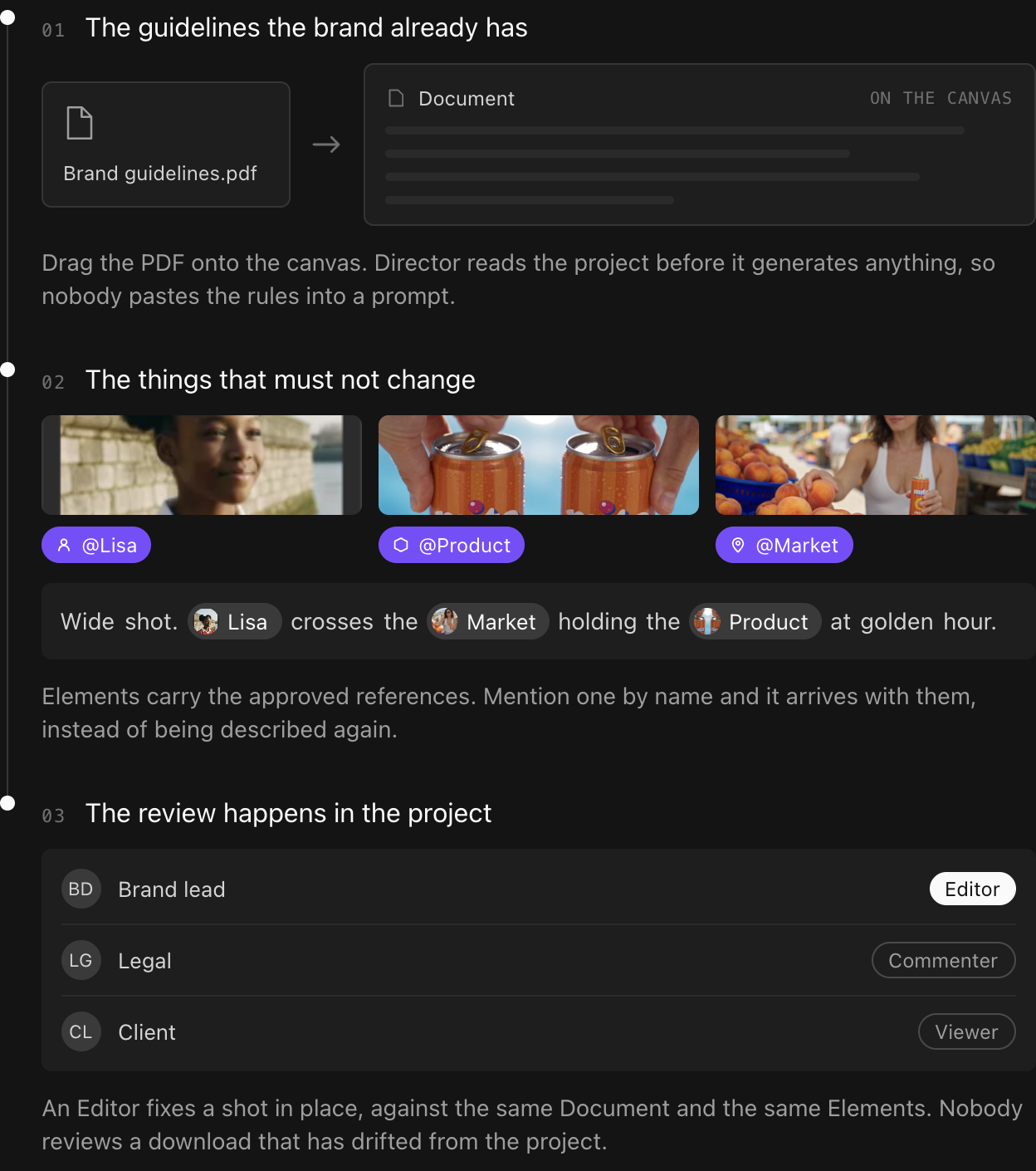
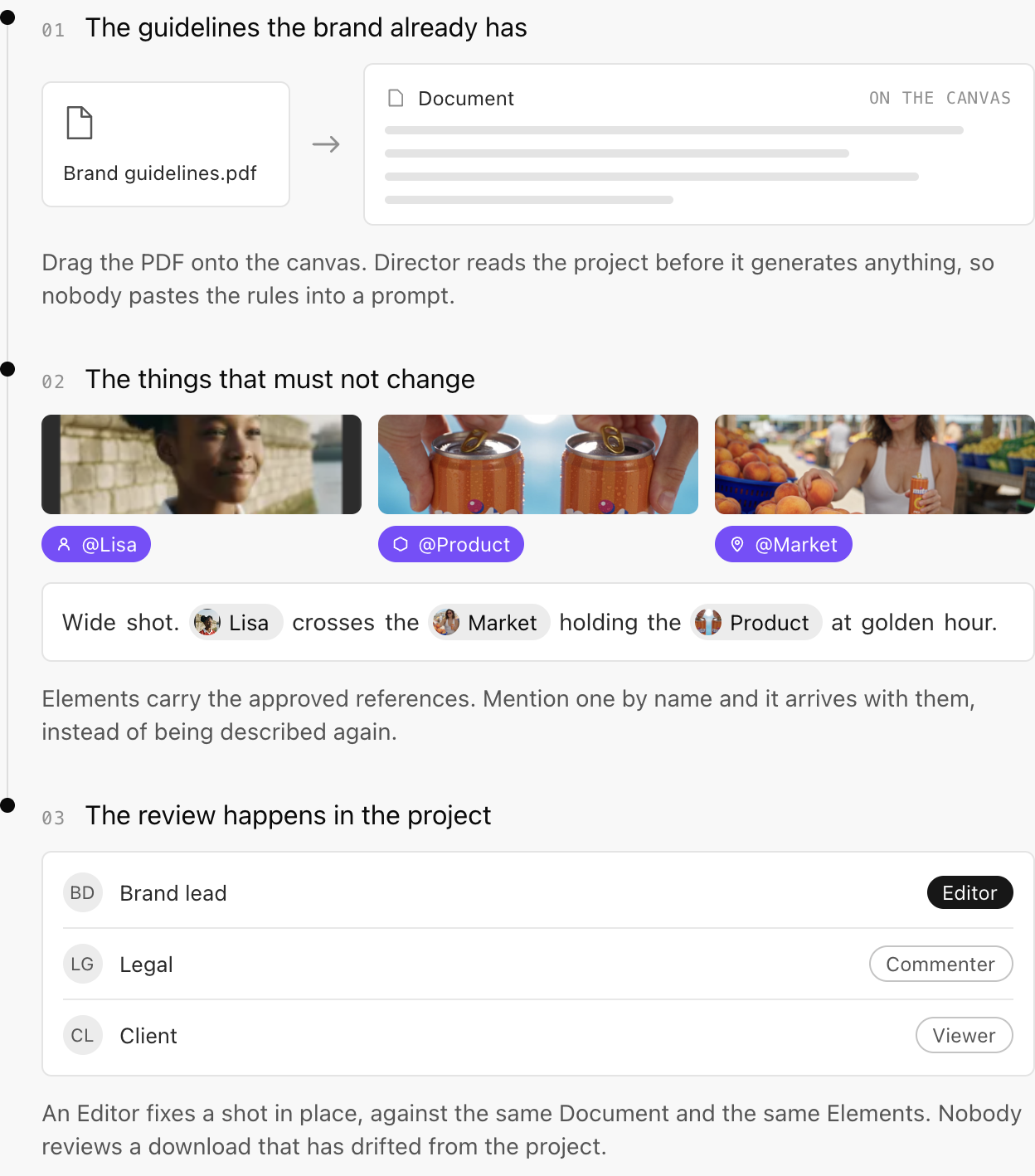
For recurring characters, locations, or objects, use the same approved reference throughout the sequence. Keep identity details with the reusable reference, and put each shot’s action and camera direction in the scene prompt. MITO’s guide to Elements shows this separation for characters, locations, and objects.
Build and test the sequence before scaling it
Plan the ad as a series of shots, not as one long prompt. A storyboard makes it easier to see whether the story, product, and visual treatment hold together before the team spends time generating every variation.
For each shot, record:
- Purpose: what does this shot add to the story or message?
- Fixed details: which brand, product, character, location, or claim details must remain?
- Direction: what changes in this shot, such as action, framing, movement, or lighting?
- Reference: which approved assets should guide the generation?
- Review question: what specific failure would make the team reject this shot?
Test the fragile parts first. Generate one product close-up, one shot with the recurring character, and one scene that changes angle or setting. Compare them against the source pack before generating the full ad. If a product shape, wardrobe detail, location, or visual rule drifts, correct the reference or the shot direction and test again.
One reference image may not show enough of a space to guide a reverse angle. Add useful views of a location when continuity depends on details outside the first frame, which is what Location Scout is for. MITO’s Document tutorial explains how a Document can hold written rules inside a project, while its character continuity guide covers reusable subject references. These are product-specific ways to support a broader production workflow, not substitutes for brand approval.
Do not assume the same prompt or reference produces identical results across models. Test the model you intend to use, inspect its output, and keep a human review before extending the method to the complete sequence.
Protect logos, product details, and claims
Treat exact logos, packaging text, labels, prices, and small print as precision artwork, not as details to trust to a generated frame. Start from approved source files. If a model distorts a mark or changes a label, replace or composite it in an editing step using the authorized asset, then check that the result looks natural at the final viewing size.
Review the product itself in every shot where a viewer could make a judgment about it. Check its silhouette, color, packaging, proportions, features, and how it is being used. Do not let an attractive image imply a product result the brand cannot support. A visual demonstration can communicate a claim even when the voiceover does not say it directly. The FTC says advertisers should substantiate express and implied advertising claims before they run, so keep the support for each objective claim with the campaign brief.
The same care applies to people and voices. Confirm that a real person’s likeness, performance, or voice is approved for this use, and keep the permission with the campaign record. For paid endorsements or other material connections, check the rules that apply to the campaign and where it will run. The FTC’s Endorsement Guides define a clear and conspicuous disclosure as one that is hard to miss and easy to understand, and say video disclosures should appear visually and audibly when the endorsement is made in both forms. Microsoft’s advertising guidance also tells advertisers to confirm required rights and consent, provide disclosures where required, and review AI-assisted creative for accurate portrayals of people, products, and claims.
Review at the points where drift appears
Do not wait for a polished cut to find a wrong package, an off-brand line, or a disclosure that is too small to read.
- At storyboard approval. Check the message, sequence, product role, visual direction, and placements.
- After the first test shots. Compare the generated character, product, environment, and palette with the approved references.
- During the edit. Review continuity across cuts, on-screen copy, voiceover, music, captions, and any revisions made to individual shots.
- At final delivery. Watch each export at its intended size and with sound both on and off. Check crops, readable text, safe areas, disclosures, and the final call to action.
Assign a named reviewer to approve the final version. Keep the approved export, asset sources, model used, key decisions, and sign-off together so later adaptations have a reliable reference.
Pre-publication checklist
- The team used current, approved brand and product references.
- Fixed brand details remain consistent across every shot and format.
- The product, packaging, logo, and visible text match authorized source assets.
- The script, voiceover, captions, and visuals communicate the same supported message.
- Claims are supported, and visual demonstrations do not suggest unapproved results.
- Rights and permissions for supplied assets, people, voices, and music are confirmed.
- Any required disclosure is clear in the format where the claim or endorsement appears.
- Each crop and export has been checked at its intended viewing size.
- The responsible reviewer has approved the exact version scheduled to run.
Further reading and sources
- How to Keep AI Video Characters Consistent Across Scenes
- How to Keep Every AI Generation On Brand with One Document
- Federal Trade Commission: Advertising Substantiation Principles
- Federal Trade Commission: Guides Concerning the Use of Endorsements and Testimonials in Advertising (2023)
- Microsoft Advertising: AI-generated and synthetic content in advertising
Frequently asked
- What should go in a brand guide for AI video ads?
Include approved logos and product assets, palette and typography, visual and verbal examples, audience and campaign message, claims that are allowed or prohibited, rights notes, and placement requirements. Make the non-negotiable rules easy to find and identify the current version.
- How do I keep a product consistent across AI-generated shots?
Use approved product references wherever the product recurs, and test a close-up early. Check the shape, color, packaging, labels, and visible features in each shot. Replace distorted logos or text with authorized artwork during editing rather than relying on generated lettering.
- Should a team review AI-generated ad footage before publishing?
Yes. A human reviewer should check the actual export for product accuracy, supported claims, rights, continuity, disclosures, legibility, and placement requirements. The review should happen on the version that will run, not only on a storyboard or an earlier cut.
- What is the difference between this and a brand Document in MITO?
This is the production workflow a brand team runs around any AI video tool: approvals, fixed details, review points, rights and claims. A Document is one place inside a MITO project to keep the written rules so Director reads them before it generates. The Document holds the rules. The workflow is what makes someone check them.
The AI tool for cinematic video.
Generate, direct, and publish professional videos — powered by the best AI models.
More posts