Take Apart an Ad That Works
Break a reference down to its shots and rebuild it as your own.
To reverse-engineer a winning ad, break it into its skeleton: how fast it hooks, how many cuts it has, what it shows first and how it ends. Then rebuild that skeleton with your own product, your own people and your own words. You borrow the timing and the structure. You never borrow the footage.
The fastest way to a good ad is to start from one that’s already working. Not to copy it, but to learn its format. In MITO you can drop the ad on your project canvas and ask Director to take it apart for you, then plan your version shot by shot.
We rebuilt two videos this way: a short-form clip for a creator and a product ad for a skincare brand. Both are below, side by side with the video they were built from.
The same skeleton
Here’s the creator example. On the left, a short that works: a latte pour, a barista at the machine, the cup set down on the counter. On the right, the same three beats with the same cut points, in a different world: clay on the wheel, a potter at work, the finished bowl set on a table.
Nothing was copied but the timing. Both clips are 6 seconds, 9:16, and cut at the same two points: about 1.5 seconds and 4 seconds. That gives three beats:
| Beat | Time | What it does |
|---|---|---|
| Hook | 0 to 1.5 s | One close, satisfying detail that makes you stop scrolling |
| Build | 1.5 to 4 s | Pull back to show the person doing the work |
| Payoff | 4 to 6 s | The finished thing, set down, held for a beat |
We made both clips in MITO, including the “original” on the left. It’s a stand-in we generated, so we could show the method without reusing anyone’s real video. Each clip is one Omni 1.2 Flash generation, 720p, from a single prompt with timestamps for the three beats. Writing the beats as timestamps in one prompt is what keeps the cut points where you want them.
Again, for a product ad
The small business version works the same way. On the left, an ad format that works: a dropper bottle pulled from a tote bag, a woman applying it in the mirror, the bottle left on a sunny windowsill. On the right, the same three beats and the same cut points, rebuilt for Calmara.
Both clips cut at 1.5 and 4.0 seconds. Everything else changed: a different woman, a different product, a different bathroom, a plant on the windowsill. Because the rebuild had the product sheet as its reference, the jar and the wordmark stay right in every beat, and the teal lid matches whenever it’s on.
It works for images too
A static ad has a skeleton as well: the framing, the background, the caption style. Here’s one image format, rebuilt the same way with Nano Banana Pro.

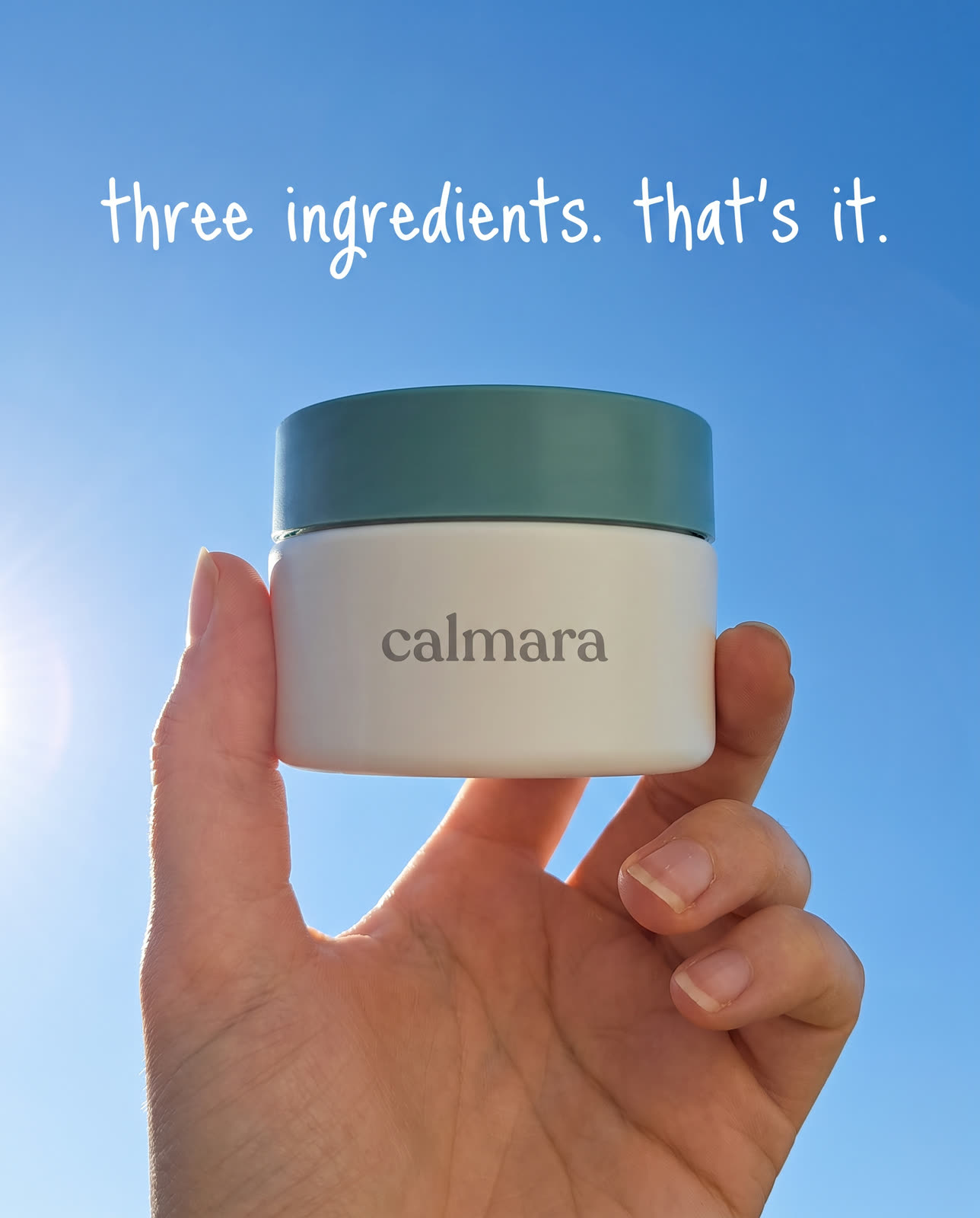
Same framing, same sky, same caption style. New product, new words. The line is the part you never borrow: “the only thing I re-buy” belongs to the original. “Three ingredients. That’s it.” is a claim about your own product.
Breaking it down with Director
In MITO, drop the video or image onto your project canvas and ask Director to reverse-engineer it. It writes the breakdown right next to it: every clip with a keyframe, the script, the text on screen, the music and sound, and a prompting guide for each one, written so it works for your product. Then pick your goal, like “same format, my product”, and it plans your version shot by shot. Nothing is generated until you approve the plan, a test shot and the cost.
What you get on the canvas
The breakdown is saved as documents next to the video, so nothing lives only in the chat:
| Document | What’s in it |
|---|---|
| Video Overview | Length, format, clip count, the hook-to-payoff structure and the pacing |
| Transcript | Every spoken line, timed, with how it’s delivered |
| Shot Breakdown | Every clip with a keyframe, shot size, camera move and transition |
| Scenes & Locations | Each place, its look and light |
| Characters & Objects | Who’s on screen (described, never named) and how the product is shown |
| Text Overlays & Graphics | Every on-screen line, where it sits and how it animates |
| Music & Sound | Tempo, mood, effects and where the hits land on the cuts |
Each one ends with a prompting guide: the same look, sound or camera move written as a fill-in prompt for your own product. When you pick a goal, Director adds a recreation plan and a prompt for every shot. Analysis and documents cost no credits. Nothing is generated until you approve a test shot and its cost.
Download the Reverse-engineer workflow (a Markdown file) to run the same breakdown step by step in your own project.
If you’d rather work from a description, the steps are the same in plain prompts:
- Get the skeleton. Describe the video to Director, or paste its transcript: “Break this into hook, beats and cuts. How long is each shot?”
- Strip the topic. “Keep the skeleton, remove anything specific to this creator.”
- Give it your world. “Rebuild it for my character, in my studio, same timings.” Director writes the shot list and the prompts.
- Generate and cut. Generate the shots, cut them on the Timeline to the original rhythm, and change one thing: the hook line, the ending or the setting.
What never to borrow
This is the line between learning from an ad and copying it.
Borrow the structure:
- The timing: how long the hook lasts, where the cuts land
- The order of the beats: detail first, then the person, then the result
- The framing: close-up, mirror shot, product on a windowsill
- The type of hook: a satisfying close-up, a question, a surprising first line
Never borrow the footage, the people, the logo, the music or the exact lines.
Write your own script and attach your own product. If you have a product Element, attach it to every generation, so the label is right in every shot. (Here’s how to make one.)
Before you post, watch yours next to the original. If it still reads as their ad, change the setting or the hook line until it doesn’t.
Try it
- Save a video or ad in your category that’s doing well, and drop it on your project canvas.
- Ask Director: “Reverse-engineer this video.”
- Choose “same format, my product”, and attach your product Element or your character.
- Approve the plan and the test shot, then generate the rest.
- Cut it on the Timeline to the same rhythm, with your own voiceover.
For more on getting a full brief through this process, see How to Run a Brief Through AI Video. If your version needs a real-looking person on camera, How to Make AI UGC Ads That Don’t Look Like AI has the briefs we use.
Frequently asked
- What does it mean to reverse-engineer an ad?
It means breaking a working ad into its structure: how long the hook is, how many cuts there are, what it shows first and how it ends. You then rebuild that structure with your own product, people and script. You keep the format, not the content.
- Is reverse-engineering an ad the same as copying it?
No, as long as you only take the structure: the timing, the order of the beats, the framing and the type of hook. Copying is taking the footage, the people, the logo, the music or the exact lines. Write your own script and use your own product.
- Can AI break down a video into shots?
Yes. In MITO you can drop a video on your project canvas and ask Director to reverse-engineer it. It lists every clip with a keyframe, the script, the on-screen text, the music and sound, and a prompting guide for each shot.
- How do I keep the same timing as the original?
Write the beats as timestamps in one prompt, for example a hook from 0 to 1.5 seconds, a build to 4 seconds and a payoff to 6 seconds. Then cut the shots on the Timeline to the same rhythm as the original.
- Does reverse-engineering work for image ads?
Yes. A static ad has a format too: the framing, the background and the caption style. Keep those, then swap in your product and write a new line of your own.
- What should I change so my version isn't a copy?
Everything except the structure: the people, the setting, the product, the music and the words. A good test is to watch both side by side. If yours still reads as the original, change the hook line or the setting.
The AI tool for cinematic video.
Generate, direct, and publish professional videos, powered by the best AI models.