UGC Ads That Don't Look Like AI
Two ads from one product photo, the exact briefs, and the check before posting.
The fastest way to get an ad skipped is to make it look like an ad. The second fastest is to make it look like AI: glossy skin, perfect teeth, a product floating on a gradient with a sparkle on the lid.
UGC (user-generated content) works for the opposite reason. It looks like a real person picked up their phone and said something about a thing they use. You can make that look with AI video, but only if you brief the model the way you’d brief a creator: who they are, where they’re filming, what they say, and what to leave a little rough.
We made two UGC-style ads in MITO from one product photo. Below are the exact briefs, the six rules we followed, and the one check we run before anything gets posted.
The two ads
Same jar, different person, different room. Both are 8-second clips with the line spoken on camera, and the captions are the exact briefs.
Notice what’s missing from both briefs. Nobody is “beautiful”. Nothing is “cinematic”. There’s no “studio lighting” or “4K”. The briefs describe a person, a room and a phone, and that’s most of the trick.
How we made them
Each ad is two generations: a still, then a video that starts from it. Both trace back to one product shot of a Calmara skincare jar:
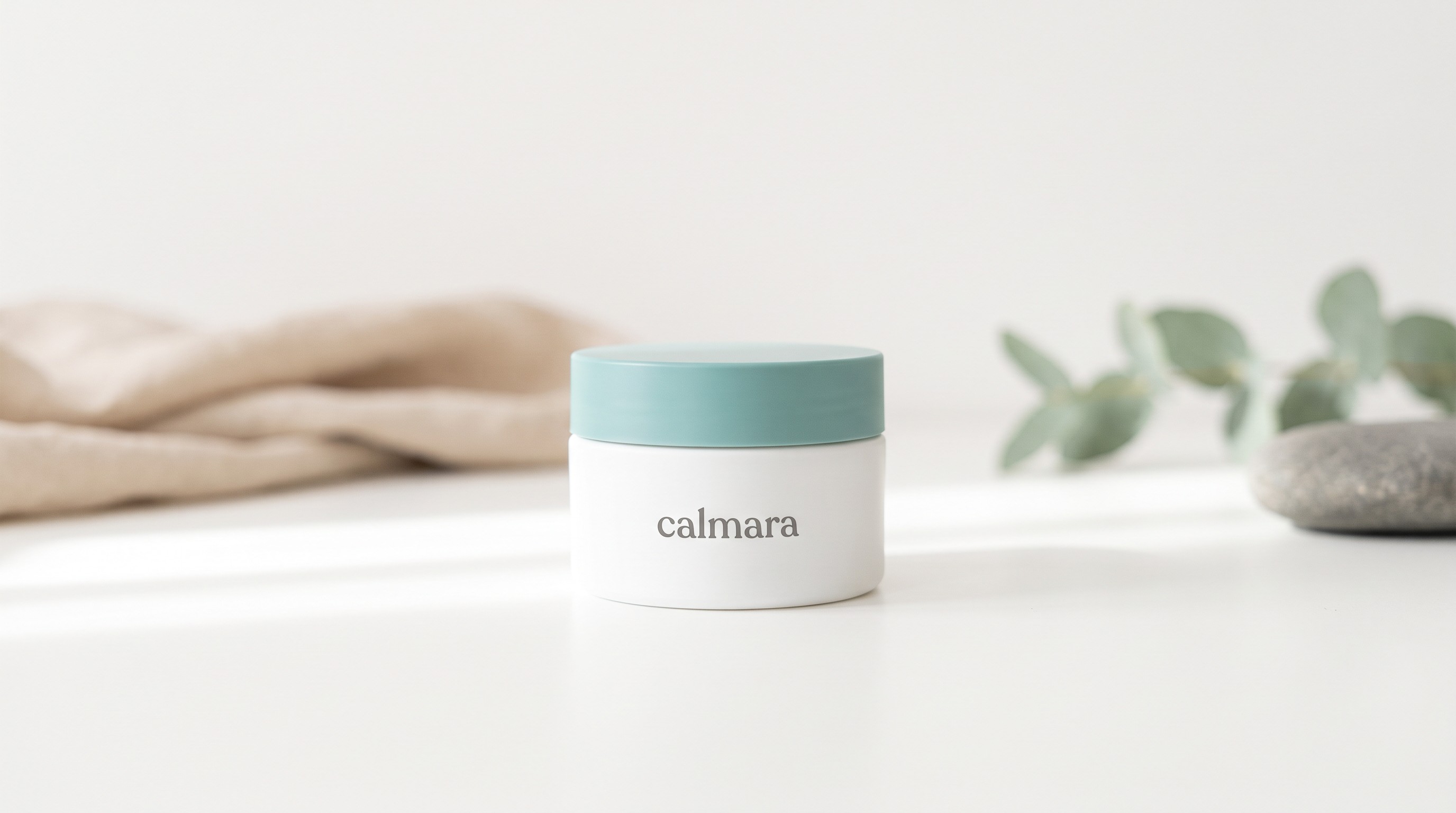
The product shot both ads start from.
- The still. We generated the first frame with Nano Banana Pro, with the product attached as a reference: the product shot for the bathroom still, and a product sheet made from it for the kitchen still. That’s what keeps the label, the lid color and the jar shape right. Getting the still right first is cheaper than fixing it in video. (More on that in What Is a Start Frame in AI Video Generation?)
- The video. We animated that frame with Veo 3.1 Fast: 8 seconds, 9:16, 720p, with the spoken line in the prompt so the model generates speech and lip movement together.
You don’t have to pick the models yourself. Tell Director “make a UGC ad of this product, filmed on a phone in a bathroom” and it writes the prompt, picks the model and shows you the cost before anything generates. The briefs above are what it’s working toward, so it helps to know what a good one looks like.
Six rules for the brief
1. Describe a person, not a model. Give an age, clothes and one or two specific details: “early thirties, bare face, hair in a claw clip”. Add “visible skin texture” if faces come back too smooth. The word “model” in a prompt pulls the result toward a photo shoot.
2. Say how it’s filmed. “Phone front camera, arm’s length, handheld” or “phone propped on the counter”. This sets the lens, the angle and the slight wobble. Leave it out and you get a steady, perfectly framed shot that reads as produced.
3. Put them somewhere real, with real clutter. A towel, a kettle, two mugs that don’t match, a fruit bowl. Real rooms have things in them that have nothing to do with the product. Empty, spotless rooms are a giveaway.
4. Write the script like speech. Short, one claim, a little unpolished. “Okay, so I’ve used this every morning for two weeks” sounds like a person. “This revolutionary formula transforms your skin” sounds like a voiceover. One short line is enough for an 8-second clip.
5. Leave out the slop words. No “stunning”, “flawless”, “cinematic”, “hyper-realistic”, sparkles, lens flares or gradient backgrounds. Each of those pushes the model toward the look you’re trying to avoid.
6. Attach your product photo as a reference. Every time. Without it, the model invents a jar that’s close to yours, and close is worse than nothing when the label is the point. If you’ll use the product a lot, turn it into a product sheet and save it as an Element (here’s how), so you can call it by name in any prompt.
The check before you post
Watch it the way your customer will: on a phone, with the sound on, for about two seconds. If anything makes you stop and squint, so will they. Then go through it frame by frame and look for the usual giveaways:
- Hands. Count the fingers, and check the grip on the product looks like a real grip.
- The label. Text that drifts, blurs or changes letters between frames.
- Skin. Too even, too smooth, no pores. Ask for “visible skin texture” and generate again.
- The mouth. Lips that move a beat before or after the words.
- The room. Too tidy, or a background object that melts as the camera moves.
Fix one thing at a time with a one-line edit (“keep everything the same, add a little skin texture”) instead of starting over.
Keep it honest
A UGC-style ad made with AI shows a person who doesn’t exist talking about a product. That’s fine as a format, but it changes what the person can say.
- Don’t make up results. The line in the ad should be something real customers actually tell you. If no customer has ever said “my skin stopped feeling tight”, don’t write it into the script, whether the person on screen is real or generated.
- Follow the platform’s AI labels. Most ad platforms ask you to mark realistic AI-generated people and voices. Check the current rules on the platform you’re posting to before the ad goes live.
- Use it to test, then decide. AI UGC is cheap to make, so it’s a good way to try ten hooks and find the two that work. Some brands then bring the winning script to real customers or creators.
Try it
- Take one clear photo of your product on a plain surface.
- Write a brief with the four parts: who they are, where they’re filming, what they say, what to leave rough.
- Ask Director to make the start frame first, check the label, then animate it.
- Watch it on your phone, check the hands, the label and the skin, and fix one thing at a time.
If you’re making a few of these for a brand, How to Keep AI Video Ads On Brand covers keeping colors, fonts and tone the same across every one.
Frequently asked
- What is a UGC ad?
A UGC (user-generated content) ad looks like a regular person filmed it on their phone, usually talking straight to camera about a product they use. It’s popular on TikTok, Reels and Shorts because it doesn’t look like a traditional ad.
- Can AI make UGC ads that look real?
Yes, if the brief describes a real-looking person, a phone camera and a lived-in room, and the product photo is attached as a reference. Most AI ads look fake because the prompt asks for polish: “beautiful”, “cinematic”, “studio light”.
- Which AI model is best for UGC video?
We used Veo 3.1 Fast for both clips because it generates the speech and the lip movement in one pass. In MITO, Director picks the model for you based on what the shot needs, and shows the cost first.
- How long should an AI UGC ad be?
Ours are 8 seconds each, one line of speech. For a full ad, cut two or three clips together on the Timeline and keep the whole thing under 30 seconds.
- How do I keep my product looking right in AI video?
Attach a real photo of the product to every generation. For repeated use, make a product sheet and save it as an Element so the shape, colors and label stay the same in every shot.
- Do I need to label AI UGC ads?
Often, yes. Many ad platforms require a label on realistic AI-generated people or voices. Rules change, so check the platform’s current ad policy before you publish.
The AI tool for cinematic video.
Generate, direct, and publish professional videos, powered by the best AI models.