One Ad, Every Market
Keep the cut and swap the language, the voice and the on-screen text.
To localize an ad for another market with AI, start from the approved master and edit it once per market: swap the talent for someone that audience recognizes, move the scene to their streets, translate the text in the frame, and have the spokesperson say the line in their language. Keep the product, the layout and the light exactly as the client signed them off.
A global campaign usually means one of two things: reshoot for every market, or run the same ad everywhere and hope it lands. The first is slow and expensive. The second looks like it was made somewhere else, because it was.
We made one ad in London, then localized it for Tokyo, São Paulo and Paris with one prompt each. Below are the four versions, the exact prompts, and the video version saying its line in English, Spanish and Japanese.
One master, three markets
The master is a print-style ad for Brisa, a sparkling lime drink: a woman at a café table on a London street, holding the can up, with a headline across the top and the product line at the bottom. We made it with Nano Banana Pro at 2K.
Each market version is a single edit of that master, with the master attached as the reference. The can, the pose and the layout never moved.
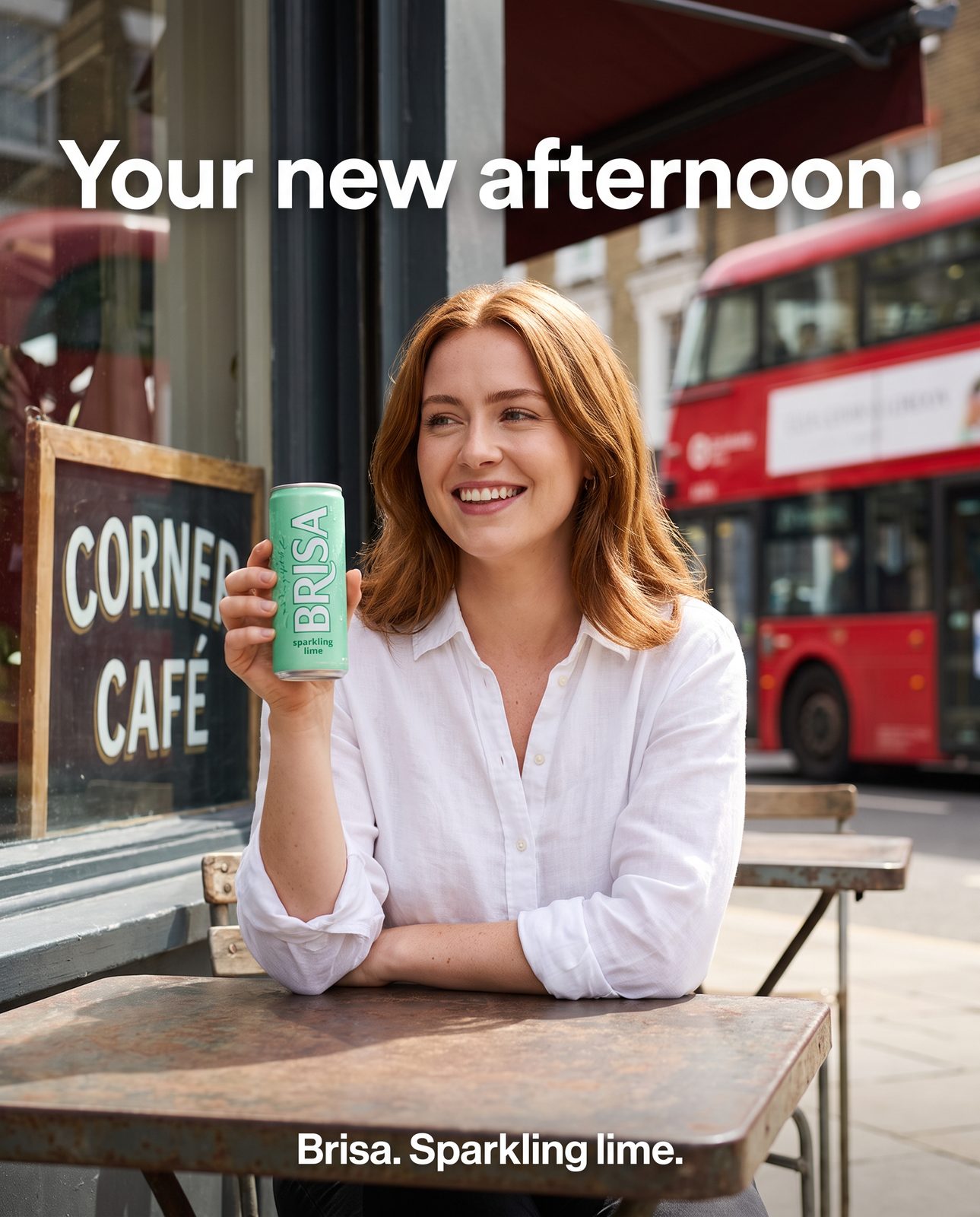
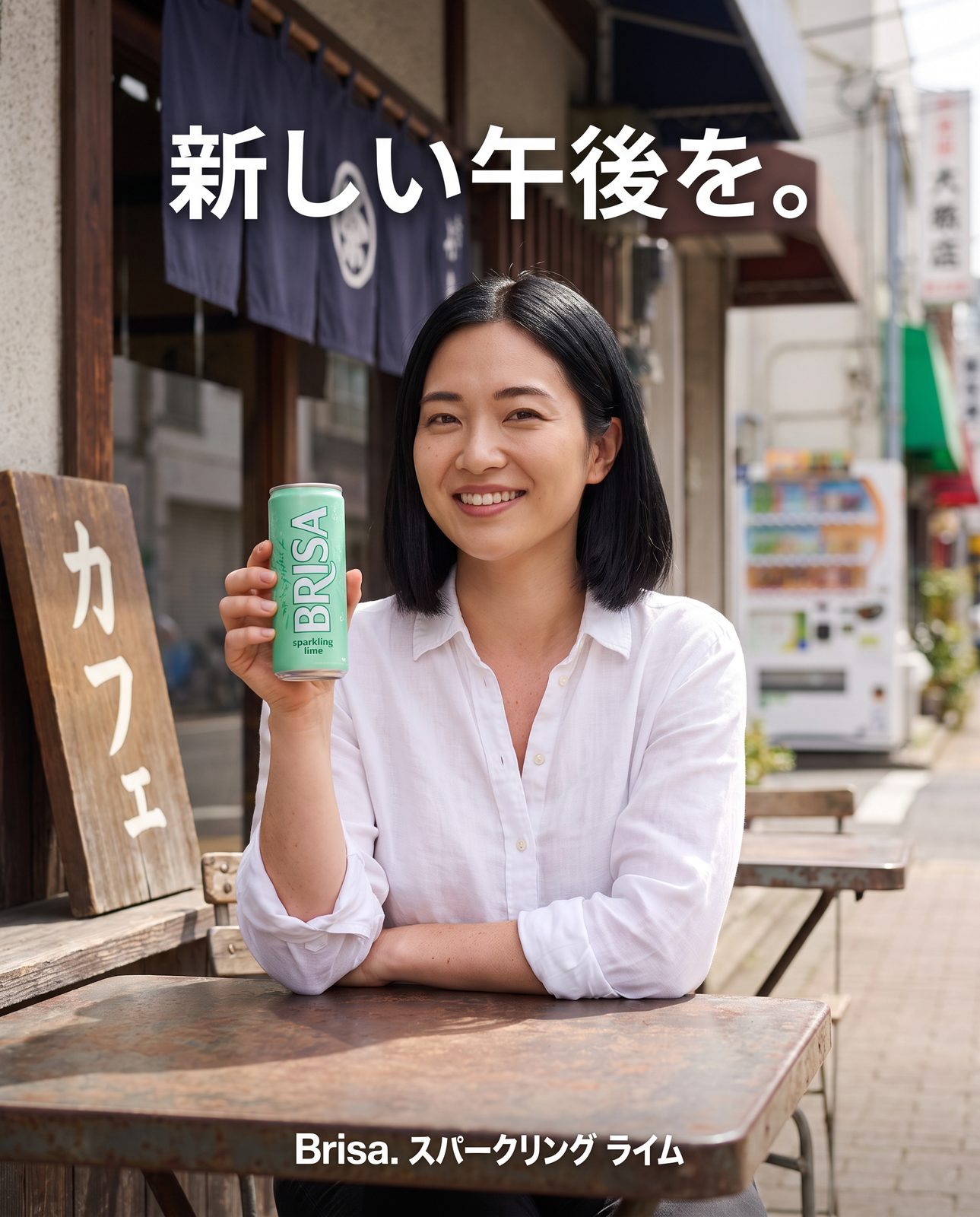
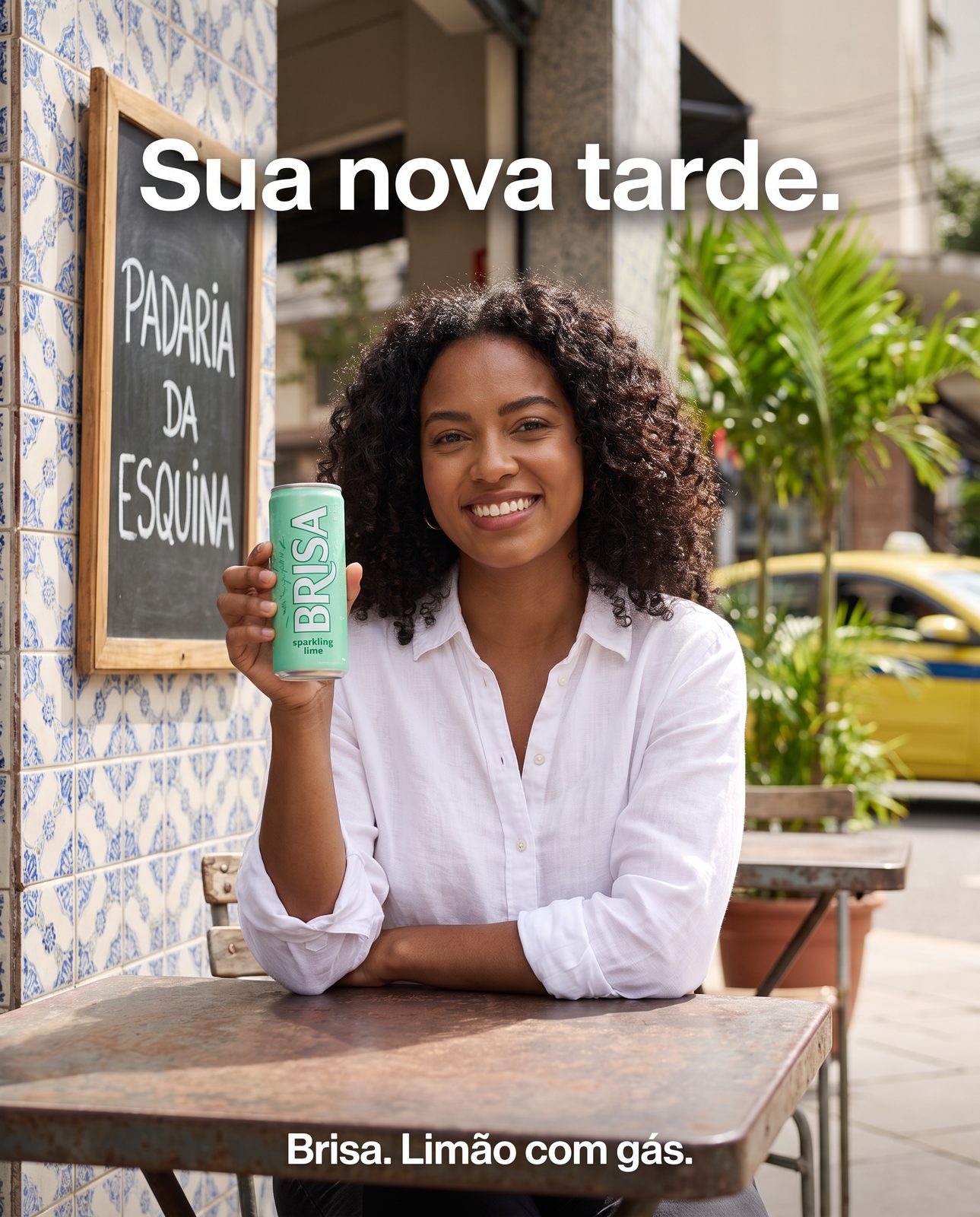
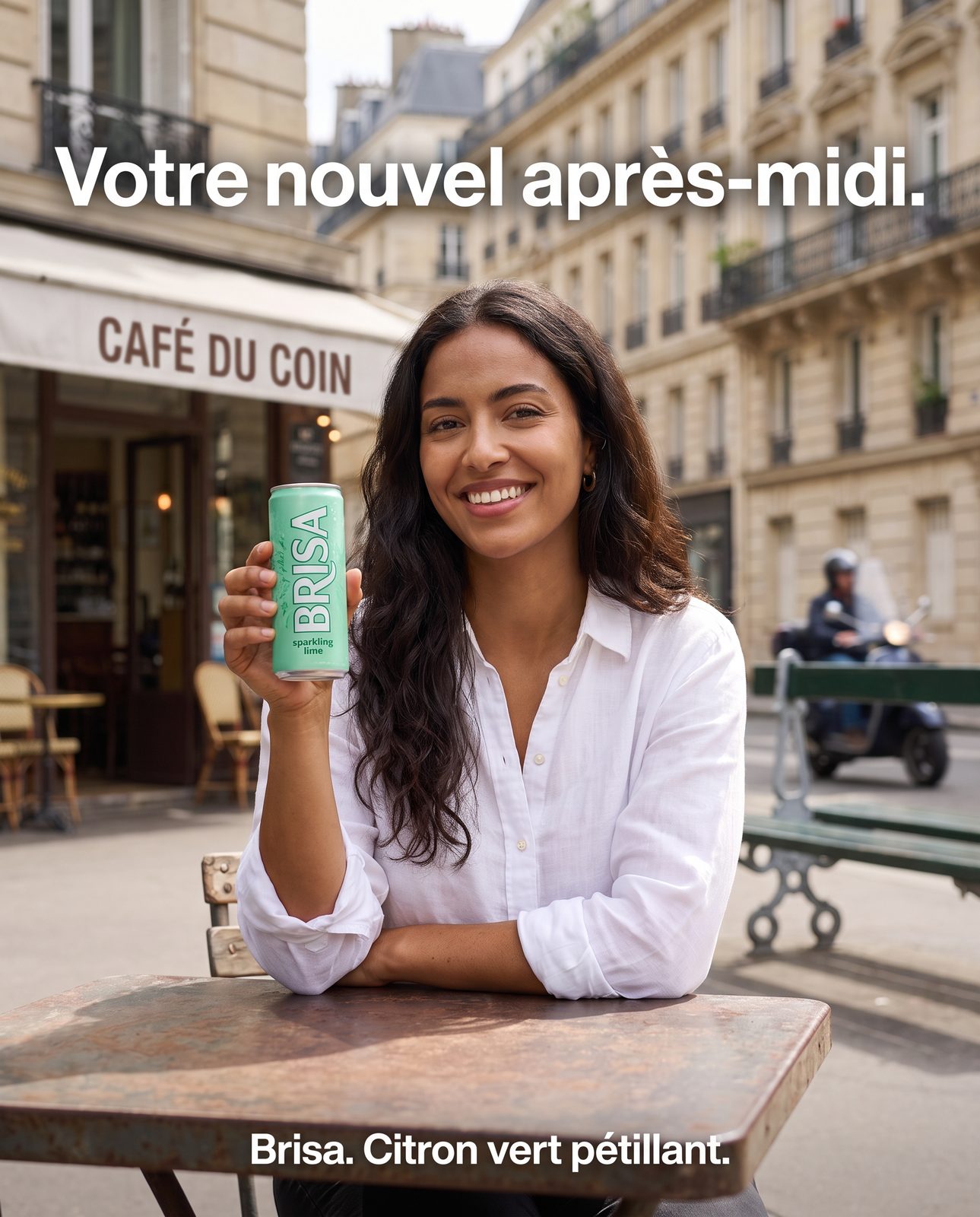
Look at what changed and what didn’t. The headline went from “Your new afternoon.” to 新しい午後を。, “Sua nova tarde.” and “Votre nouvel après-midi.” The product line under it changed language too. The café sign became a カフェ board, a padaria chalkboard and a Café du Coin awning. The person changed in every market.
The can, the white shirt, the arm on the table, the headline position and the warm side light are the same in all four. That’s the part the client approved, and it’s the part a reshoot would most likely get wrong.
Writing a localization prompt
Every prompt above has the same two halves.
What changes, market by market. Name the talent, the place and the text. Be specific about the place: “a São Paulo street with tiles and a yellow taxi” gives the model two details people in that city will recognize. “A Brazilian street” gives it nothing to work with.
What stays the same, every time. End every prompt with the same sentence: “Keep the can, the pose and the layout the same.” This is the line that stops the model from redesigning the ad. Name your own product in it.
A few things that help:
- Edit the master, don’t regenerate. Attach the approved ad as the reference and ask for changes. Starting from scratch with a new prompt gives you a new ad, not a localized one.
- One market per prompt. Do Japan, check it, then do Brazil. If one comes back wrong, you fix one prompt, not four.
- Say what text to translate. Our Tokyo prompt names both the headline and the café sign, so both came back in Japanese.
- Say who should be in it, even if it’s the same person. Our Paris prompt doesn’t mention the talent, and the model cast a new woman anyway. That suited the market, but if the client wants the same face in every country, put it in the prompt.
- Have a native speaker read every version. The model translated our headlines, but translation is the part a client in that market will check first. Treat it as a draft.
One line, three languages
A print ad only has to be read. A video ad has to be heard, so the spokesperson needs to say the line in the market’s language.
We took one frame of the London spokesperson and made three 4-second clips from it with Veo 3.1 Fast, 720p, 9:16. Each clip asks her to say the same short line about the drink, in English, Spanish and Japanese. The languages don’t match the print markets one for one: the method is the same for any language.
Because all three start from the same frame, she’s the same person in the same seat with the same can. Only the words and her mouth change. Unmute each clip to hear the difference.
If you already have a finished video, you can dub it instead of generating it again. Make the line in the new language, then run lip sync with Sync 3, MITO’s lip-sync model, so her mouth follows the new words. It takes up to 60 seconds of video at a time and costs 134 credits per second. How to Make an Avatar Video and Dub It walks through it.
Try it
- Open an approved ad in a MITO project, or upload one you’ve already made for a client.
- Write your first market prompt: the talent, a specific street, the text to translate, then “Keep the product, the pose and the layout the same.”
- Check the product and the layout against the master, then move on to the next market.
- Have someone who speaks the language read the text in the frame.
- For the video version, generate the spokesperson saying the line in each language, starting every clip from the same frame.
If the campaign also needs every banner size, How to Make Display Ads at Exact Pixel Sizes With AI covers generating each slot at the size the media plan lists. To keep the product and talent identical across a whole campaign, save them as Elements: How to Build Character and Product Sheets.
Frequently asked
- What does it mean to localize an ad?
Localizing an ad means adapting it for a specific market: changing the talent, the setting, the text and the spoken language so it feels made for that audience, while keeping the product and the approved layout the same.
- Can AI translate the text inside an image?
Yes. In our example, one prompt per market changed the headline, the product line and the café sign into Japanese, Portuguese and French while keeping the layout. Have a native speaker check every translation before it runs.
- How do I keep the product the same when localizing with AI?
Edit the approved master instead of generating a new image, and end every prompt with a line like “Keep the can, the pose and the layout the same.” Name your own product in that line.
- Should I localize one market at a time?
Yes. One prompt per market lets you check each version against the master before moving on, and if one comes back wrong you only fix that prompt.
- Can an AI spokesperson speak different languages?
Yes. We generated the same spokesperson saying one line in English, Spanish and Japanese, with each clip starting from the same frame so she stays the same person. Turn the sound on to check the words and the lip movement match.
- Is localizing cheaper than reshooting?
A localized version is one edit of the master rather than a new shoot with new talent and a new location. The product, layout and light carry over from the approved ad, so there’s less to re-approve.
The AI tool for cinematic video.
Generate, direct, and publish professional videos, powered by the best AI models.