November, first half
Everything that shipped in the first half of the month, in one place. Each entry links to the full story where there is one.
Ten days, and a Director that now works on footage you have already made. Enough happened in the first half of November that it was not going to wait for the end of the month, so this is the first half. The second half lands at the end of November.
New things first, then models.
Director
Desktop Copilot
Ask Director where something is and it will show you. Copilot knows the app’s own controls, so instead of telling you where to click it opens the panel and sets the work up with you.
This is for the half of the product a team never finds on its own, and for the new starter who would otherwise have to interrupt someone to ask.
Colour finishing
Warmer, brighter, more contrast, less saturation. Ask for the grade in words and Director adjusts the shot without generating it again, so the look changes and the take does not. The result arrives as a separate asset and the original stays where it was.
Reach for it when a cut is approved and the client wants it a stop warmer, or when three shots that will sit next to each other do not quite match.
Keep every generation on brand →
Reframing what you already have
Give Director an image that is the wrong shape and ask for more of the scene, or hand it a finished video and ask for a different aspect ratio. Both work on media that already exists, so a landscape hero becomes a vertical cut without reshooting it.
The job this does is one film delivered to four places: wide for the site, vertical for stories, square for the feed, all from the shot you already approved.
Worth knowing what this is: everything outside the original frame is generated, so the new edges are invented. Check them before a reframe goes out, particularly on product and packaging.
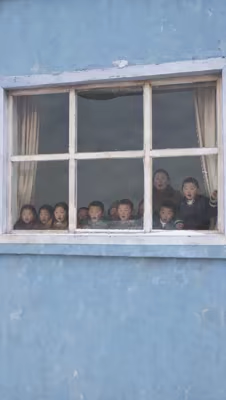
 9:16
4:5
16:9
One key visual, framed for each place it has to run.
New in the app
Provenance
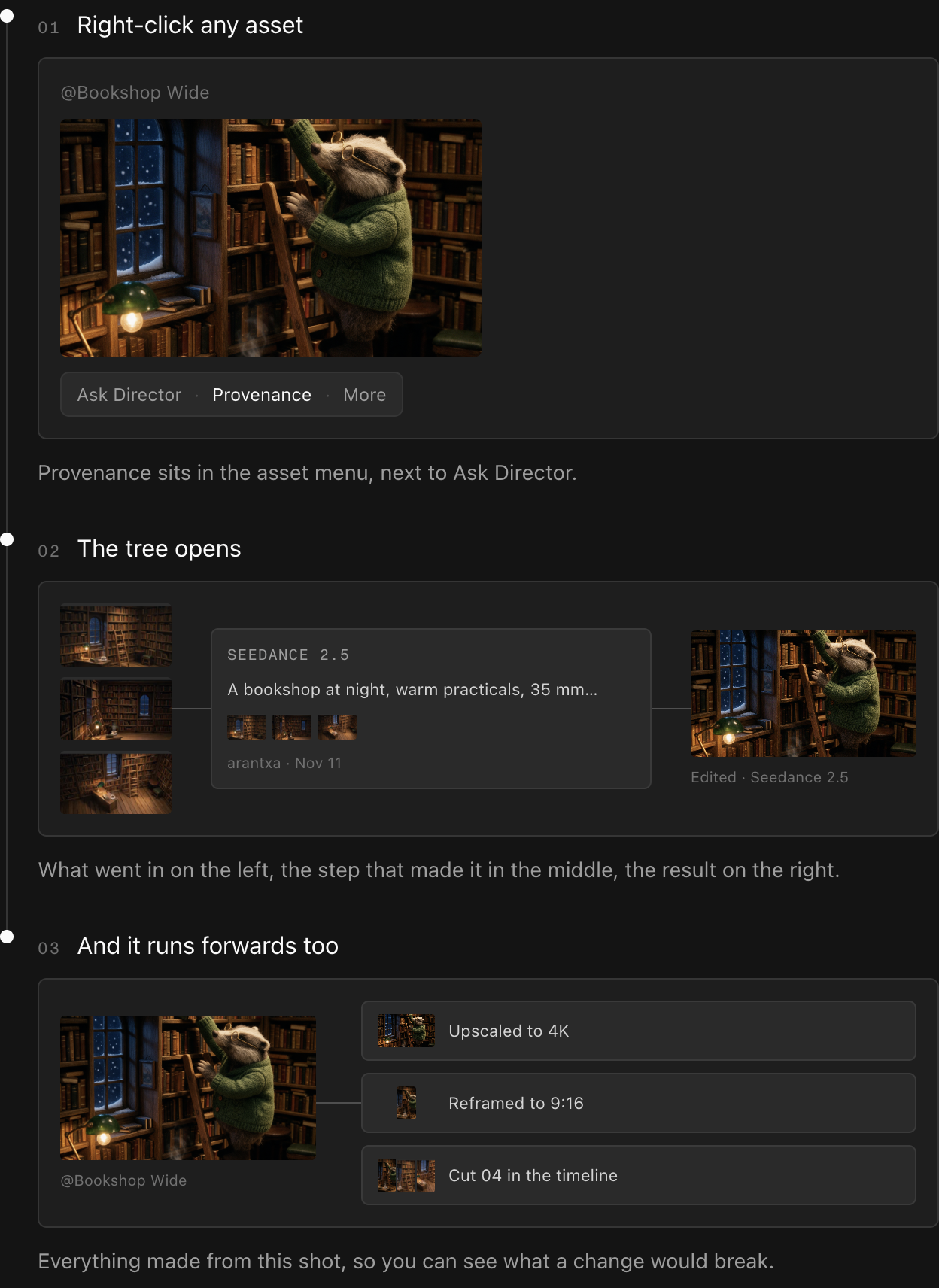
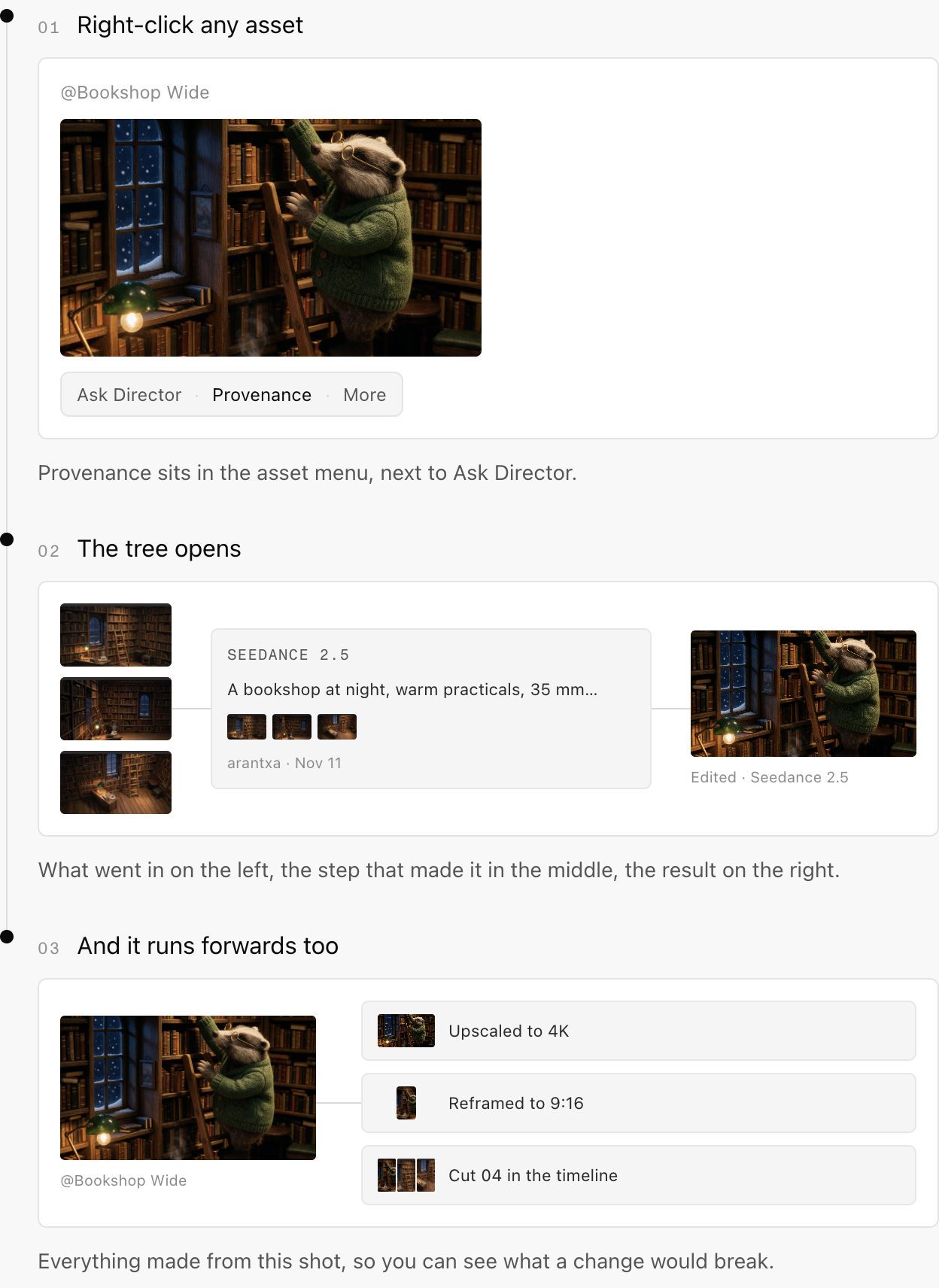
Right-click any asset and open Provenance to see what it was made from, and what has been made from it, as a tree. Each step carries the model, the prompt, the references that went in and who ran it.
Two questions it answers. Which version of the product shot did the approved cut come from, and if I change this frame now, what else breaks.
Exact pixel sizes
Ask for a specific width and height instead of picking the nearest preset, on the models that support it. For when a placement has a fixed spec and the nearest preset is not it. Auto is still there and still the default.
Generating images and video, step by step →
Avatar Studio filters
Narrow the stock presenters by how they look and the kind of scene they are in. Casting a presenter stops being a scroll through the whole library and becomes a short list you can actually choose from.
Silence around a recording
Add a pause before a line starts or after it ends without touching the voice. Delay the first word so it lands with the cut rather than on top of it, or leave a beat at the end so the shot can breathe before the next one.
The padding itself is free. Lip syncing the padded clip afterwards is charged as usual.
Voice and sound, step by step →
Clearer credit reporting
The total for the period you have selected sits next to your spending limit, so the number you are reading and the number you are measuring it against are in the same place. Mostly a question of whether a team is on track for the month without anyone doing arithmetic.
Media previews in MCP clients
Images, video and audio play inside chat clients that support MCP Apps, so a generation can be judged where it was asked for instead of in another tab. Clients without support keep the links.
Models
Seedream 5.5
Image generation and editing holding up to ten references at once.
The one to reach for when a single frame has to carry several fixed things at the same time: the product, the face, the room and the look, none of which are allowed to drift.
Seedance 2.5 in 4K
Seedance 2.5 renders at 4K through Director, MCP and the API. Same model, more resolution, for a piece going to a big screen or one that needs room to crop and reframe later without falling apart.
The 4K option in the ordinary video menu is not open yet.
GPT Image 2.6, Flare and Sunburst
Both variants move up a version, with generation and editing, multiple references and output up to 4K. The split between them is unchanged, and it is the useful part: Flare is for throwing fifteen ideas at the wall, Sunburst is for the asset the client already approved.
How Flare and Sunburst differ →
Omni 1.2 Flash
Video generation and editing with reference inputs and first and last frames, up to 4K.
First and last frame is the control worth knowing. Give it where a shot starts and where it ends and it fills the move between them, which is how you get a camera move that arrives exactly where the next cut needs it.
LTX 2.5 Upscale
Takes a video you have already made up to 1080p or 4K, through Director or MCP. It upscales existing footage rather than generating anything new, which is the point: the cut that was approved at low resolution and now has to run somewhere bigger keeps the take it was approved for.
Cartesia Sonic 3.6
Voice cloning moves to Sonic 3.6, and a clone now needs between three and sixty seconds of reference audio.
Three seconds is the headline. A voice note is enough to get a usable clone, where before someone had to sit down and record properly. This sits behind voice cloning rather than appearing as its own choice in the speech menu.
ElevenLabs v2.5 music and v3 sound effects
Two separate upgrades, one for the music bed and one for effects. Between them they cover what a finished cut is usually still missing at the end of the day.
That’s the first half of November. The rest of the month lands at the end of November. Everything above is live in MITO now.
The AI tool for cinematic video.
Generate, direct, and publish professional videos — powered by the best AI models.
More posts