Director Copilot Shows You Where Things Are
MITO's Director Copilot answers a question about the app by pointing at the control on your screen, instead of describing where to click.
In MITO, Director Copilot answers the question “where is that” by pointing at it. Ask where something lives and Director lights up the control on your screen, rather than describing a route you then have to translate.
It solves a specific kind of stuck, and one that has nothing to do with skill. You have written the brief, you have the shots, and now you want to put a music bed under the cut. You know the tool can do it. You have even done it before. But it was three weeks ago, in a different project, and the control is behind a panel you cannot picture any more.
So you start opening things. Not because you are exploring, but because you are hunting.
Every creative tool hides most of itself
This is not a MITO problem. It is what happens to any tool that does more than one thing.
Panels, tabs, timelines, menus inside menus. Each one is a sensible home for something, and together they are a building with no signs. The features are all there and they are all reachable, but the map lives in the head of whoever built it, and in the heads of the handful of people who use the thing every single day.
Everyone else gets by on a route they memorised once. The moment the work needs something off that route, the hunting starts.
What Director Copilot is
Director already knew where everything lives. It had to: it has been reaching for those tools on your behalf since the day it launched.
Director Copilot is that knowledge pointed back at you. Ask where something is, and instead of describing the route in words, Director goes to it on your screen and shows you the control.
The difference sounds small. It is not. A written answer makes you translate a description into a thing you can see, which is exactly the step you were failing at. Pointing removes the translation.
You do not have to turn anything on
The fastest way to use this is to set nothing up. Ask Director where something is, from whatever mode you are already in, and it will point at it. That is the whole interaction, and it is the one most people want: you are mid-job, you need one thing, you ask, you get shown, you carry on.
So the honest instruction is just to ask. “Where do I generate music.” “How do I get to the timeline.” No mode to find first.
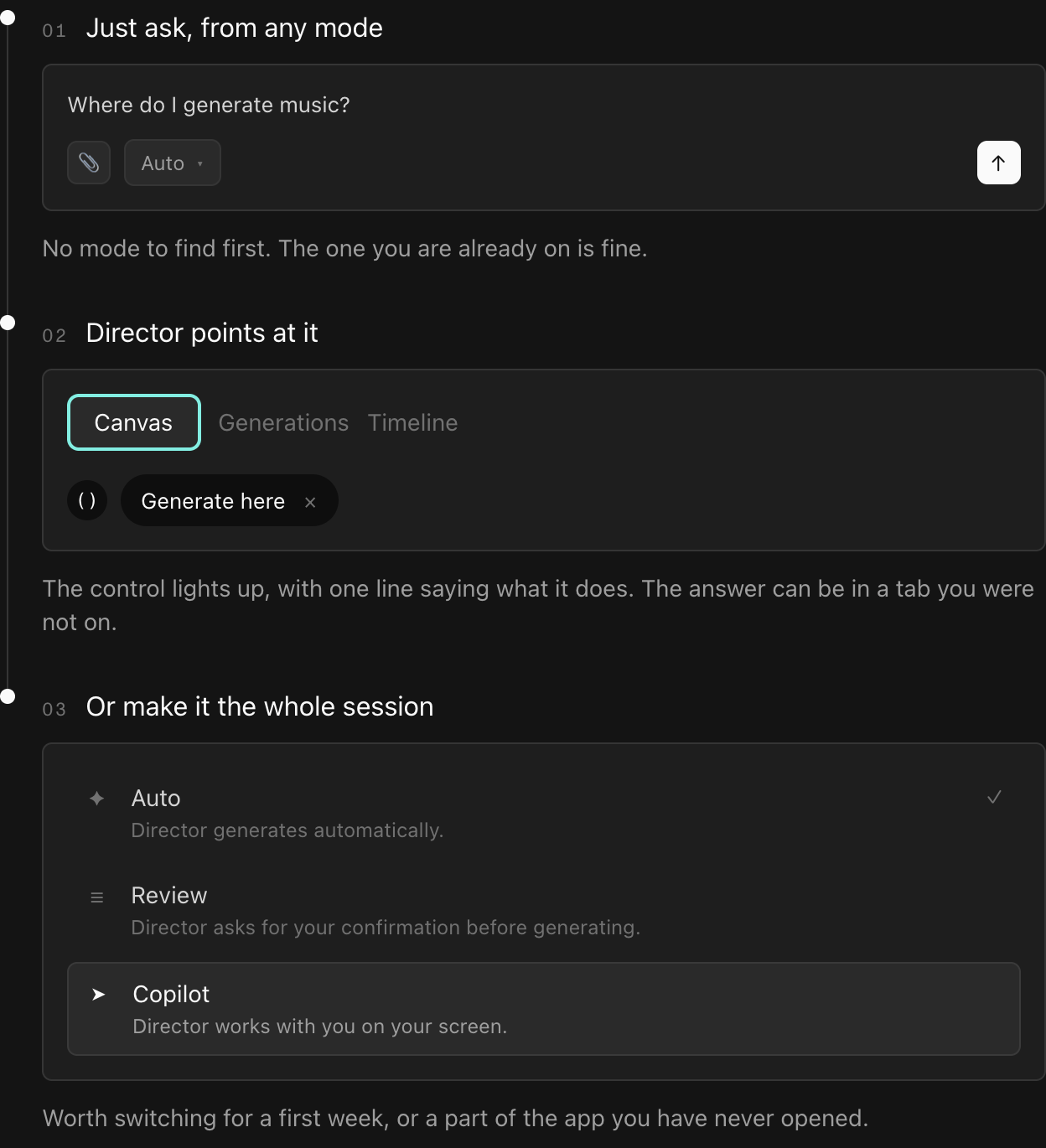
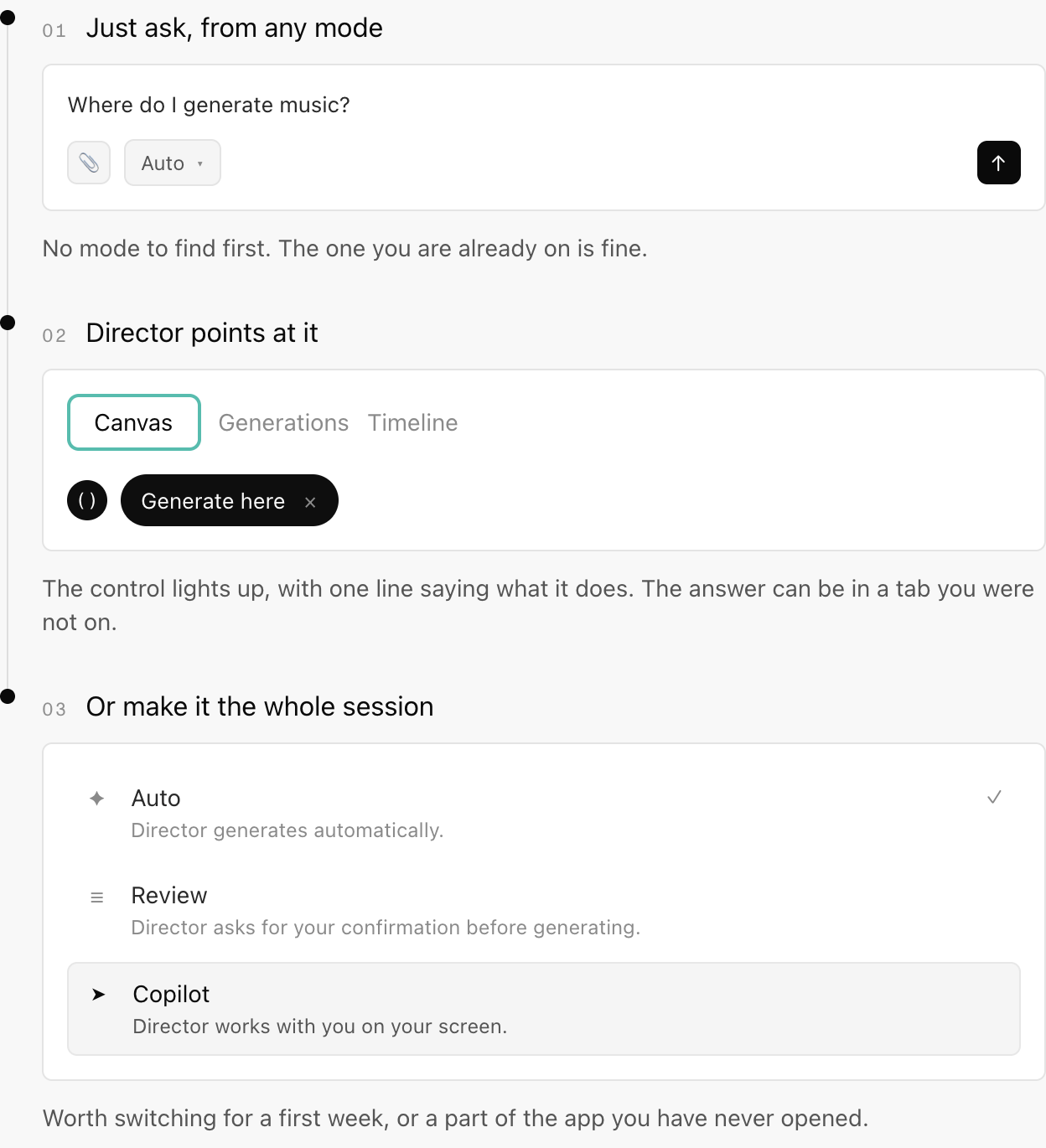
Copilot is also a mode, for when you want a whole session to work that way. It sits in the composer next to the attach button, alongside the two you already have:
- Auto. Director generates automatically. This is the one you are using now.
- Review. Director asks for your confirmation before generating.
- Copilot. Director works with you on your screen.
Switch to Copilot and Director stays beside you for everything, rather than answering one question and stepping back. That earns its place in a first week, in a part of the app you have never opened, or for someone you have just handed a project to.
Finding your way around MITO →
It shows you, then gets out of the way
Watch the film above and the pattern is the same every time.
The thing you need lights up, with a bright outline drawn around the actual control. Beside it sits a short label in Director’s own voice, saying what that control does right now: Click here to generate music. Generate here. There is an × on the label, because the whole thing is meant to be dismissed the second it has done its job.
That is the entire interface. No overlay to read, no tour to sit through, no modal explaining a feature you did not ask about. One thing lit up, one line of text, and a way to make it go away.
The film makes the point by taking it outside, which is a nicer joke than a screen recording would have been: a boy in a field, a map he cannot read, and Director floating beside him lighting up the play button on a boombox. The feeling is the same as the one at your desk. You are surrounded by the thing you are looking for and you still cannot see it.
Music, a camera, and the cut
The film follows three questions, and they are the three most people actually have.
Where do I generate music. Where do I generate video. Where do I put the clips together.
Each one is answered the same way, by Director taking you to the place that does it and lighting up the control. The three tabs of a project, Canvas, Generations and Timeline, are all fair game, so the answer can be in a tab you were not looking at. That is usually the whole reason you could not find it.
Where typing still wins
Copilot is for the question “where is this”. It is not a replacement for telling Director what you want made.
If you already know where the control is, going there yourself is faster than asking. If you want six variations of a shot, describe them; do not go looking for a button. Copilot earns its place in the gap between those two, which is wider than it sounds, and widest for anyone who has not spent the last month inside the app.
Director Copilot is live in MITO now. Open a project and ask Director where something is. Switch the mode to Copilot when you want a whole session to run that way.
Frequently asked
- What is Director Copilot?
It is Director answering a question about MITO itself by pointing at the control rather than describing it. Ask where something lives or how to do something, and the right button, tab or panel is highlighted on your screen with a short label beside it.
- Do I have to turn Copilot on?
No, and for a single question you should not bother. Ask Director where something is from whatever mode you are already in and it will point at the control. Switching modes is for when you want a whole session to work that way.
- How do I switch to Copilot mode?
The mode sits in the composer in the Director panel, next to the attach button. It holds three: Auto, where Director generates automatically; Review, where Director asks for confirmation before generating; and Copilot, where Director works with you on your screen.
- How is it different from asking Director to make something?
Asking Director to make something produces a generation. Asking where something is produces navigation: Director moves you to the part of the app that does the job and shows you the control. The second one costs you nothing but the question.
- Which parts of MITO does it cover?
The film shows it working across the three tabs of a project: Canvas, Generations and Timeline. So the answer can be in a different tab from the one you are looking at, and Director will take you there.
The AI tool for cinematic video.
Generate, direct, and publish professional videos — powered by the best AI models.
More posts