How AI Video Works: Models, Platforms, and One Real Build
Two layers explain the whole AI video landscape. The models generating the footage, and the platforms built to turn that into something usable.
Everyone throws the term “AI video” around like it is one thing. It is not. It is two completely different layers stacked on top of each other, and once that clicks, the whole space makes a lot more sense.
Layer one is the models actually generating footage. Layer two is the platforms built on top of them. Here is what each one does, plus a real example of what building something on that second layer looks like, start to finish.
Layer one: the models
This is the raw generation layer. Models like Kling and Seedance, turning a prompt directly into footage.
These are doing the actual heavy lifting, and they are not interchangeable. The same prompt run through two different models can come back with completely different motion, style and fidelity. Same words in, genuinely different films out.
Here is one prompt, run twice:
A Pixar-style animated sequence: A young girl sneaks out of her bedroom, slips on a superhero mask, and teams up with her talking orange cat. Together, they leap into action to stop a neighborhood wall graffitist.
The same prompt, the same settings, two models. Press play on each.
Identical settings on both sides. Everything that differs is the model’s own reading of the same sentence, and the two readings are not close.
Seedance stays indoors, in daylight, and goes tight. A close-up on the girl’s face as the mask goes on, shallow focus, the cat a soft orange shape in the window behind her.
Omni goes outside, at night, and goes wide. The girl mid-stride across a back garden, toys scattered in the grass, the cat watching from the fence. Both of them masked, which the prompt never actually asked for.
Neither one is wrong. The prompt never said where, or when, or how close to stand. That is the part worth sitting with: the model is making real directorial decisions in every gap you leave it, so which one you reach for is a creative choice with a visible result rather than a technical default. The video model guide breaks down what each tends to be good at.
Almost nobody talks to these models directly, though. That is what the second layer is for.
Layer two: the platforms
MITO, Runway, OpenArt, Higgsfield. These exist because access to raw models only gets you footage. It does not get you character consistency, more than one model to choose between, or an actual edit. All the things that turn “a generated clip” into “a finished video.”
MITO’s approach specifically is to make filmmaking and AI video production easier for creatives and teams: a collaborative canvas with a built-in assistant, Director, doing the heavy lifting. Instead of stitching together prompts, references and edits yourself, you describe what you want and it builds the production around that one idea.
Building one, live: from one sentence to a finished short film
Here is what that actually looks like. We opened a new project on MITO’s canvas and gave Director one sentence:
I want a 30 second, Pixar-styled short film, where a mischievous girl cuts a strand of her own hair and enjoys it, then keeps cutting until she’s bald. She’s in her bathroom and her cat is watching the whole thing.
From that, Director wrote the script, built a production plan, and generated the character and location references it needed: the girl, the cat, the bathroom. Those references are what MITO calls Elements, the same mechanism covered in Keep the same character in every shot. It added sound design and voiceover automatically, then dropped everything into a timeline we could edit directly.
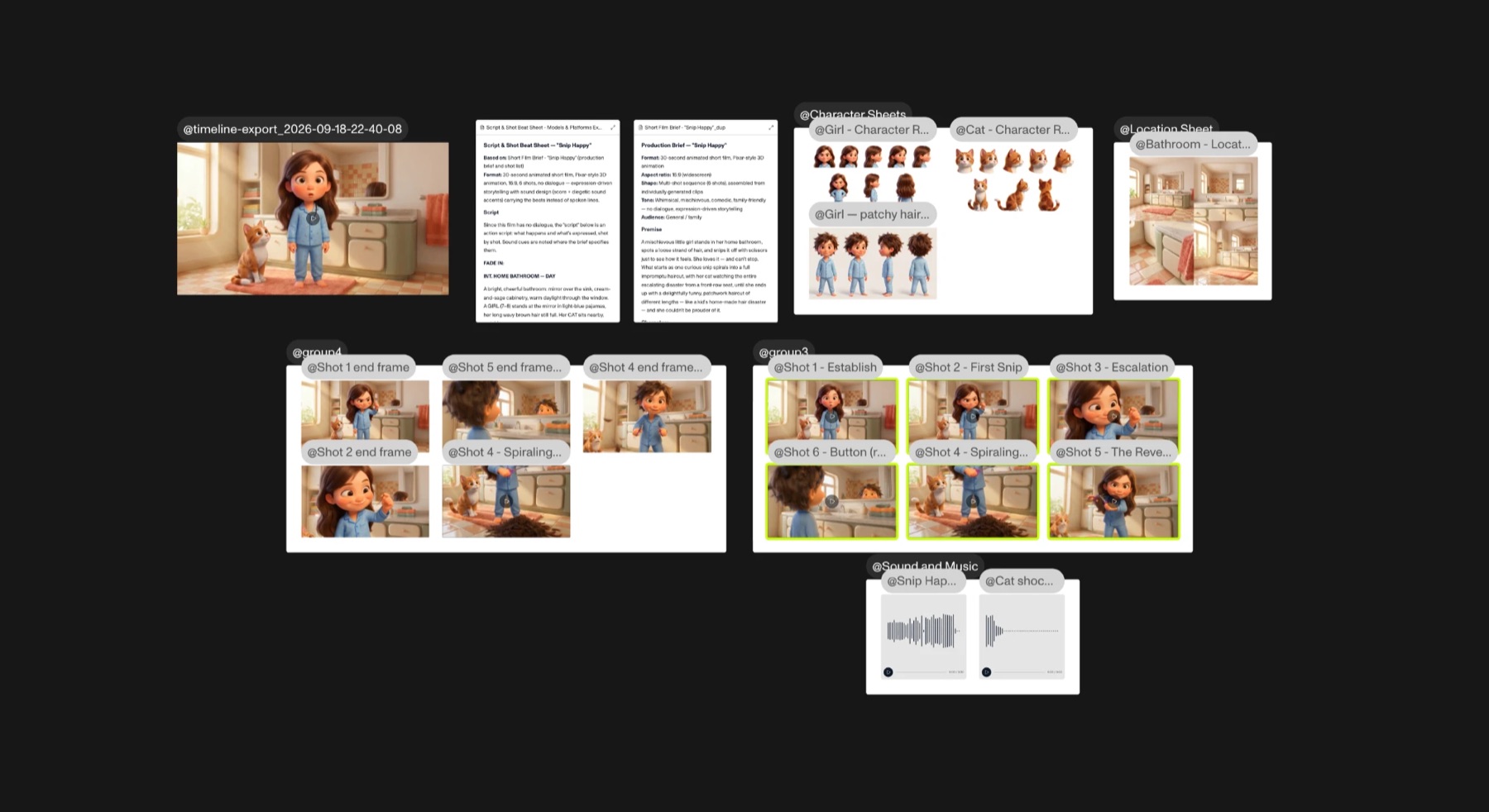 Everything above came from that one sentence: the beat sheet, the character and location sheets, six shots grouped as key frames and clips, and the sound and music.
Total time, with a counter running on screen the whole way: about four minutes. One sentence in, a full short film out.
This example is deliberately quick, and that is the point of it. For the full step-by-step version, including locking references into Elements before you generate anything, catching continuity drift at the key frame instead of the video, and scoring the final cut, see How to Make an AI Explainer Video, Start to Finish.
The short version. Models generate the footage. Platforms turn that into something usable. Director turns one idea into a finished production, start to finish.
The distinction matters more than it sounds like it should. Most of the confusion about what AI video can and cannot do yet comes from judging the whole space by one layer of it.
Frequently asked
- What is the difference between an AI video model and an AI video platform?
A model, like Kling or Seedance, turns a prompt into raw footage. A platform, like MITO, Runway, OpenArt or Higgsfield, is built on top of those models to add what raw generation does not give you: character consistency, access to more than one model, and an actual edit.
- Is MITO built on top of models like Kling and Seedance?
Yes. MITO sits on the platform layer, giving you access to multiple underlying generation models through one collaborative canvas instead of requiring you to work with each model directly.
- Do different AI video models produce different results from the same prompt?
Yes, and the gap is bigger than most people expect. The same prompt run through two models can come back with different motion, different style and different fidelity. That is why which model you reach for is a real creative decision, not a technical detail.
- How long does it take to make a short film in MITO?
The example in this post, a 30-second short built from a single sentence, took about four minutes from prompt to finished, edited video. Longer or more detailed projects take longer, mostly in reviewing and correcting continuity between generations.
- Do I need filmmaking experience to use Director?
No. You describe the idea in plain language and Director handles the script, the production plan, the references, the sound and the initial timeline assembly. You edit from there.
- Can I see the exact prompt used in this example?
Yes, it is quoted in full in the walkthrough section above. One sentence covering the story, the style, the setting and the characters.
The AI tool for cinematic video.
Generate, direct, and publish professional videos — powered by the best AI models.
More posts