One Camera Move per Shot
Name one move and the model does it. Name three and it does none of them.
The camera movement prompts that work in AI video are short and singular: one move per shot, with a speed and a direction, written before you describe the subject. “One very slow push-in” works. “Handheld, slow pan, push in” gives you a mess, because the model tries to do all three at once.
The most famous camera moves are simple. The Godfather opens on one slow zoom out that runs for minutes. 1917 hides its cuts inside one moving camera. The Grand Budapest Hotel locks off, dead center, and lets the frame do the work. Video models respond to the same restraint.
Below are the three camera lines we used in a six-shot bar scene, word for word, and the other half of the method: making every shot as a cheap draft first and rendering only the takes we kept.
Three shots, three moves
Each prompt started with its camera line, exactly as shown.
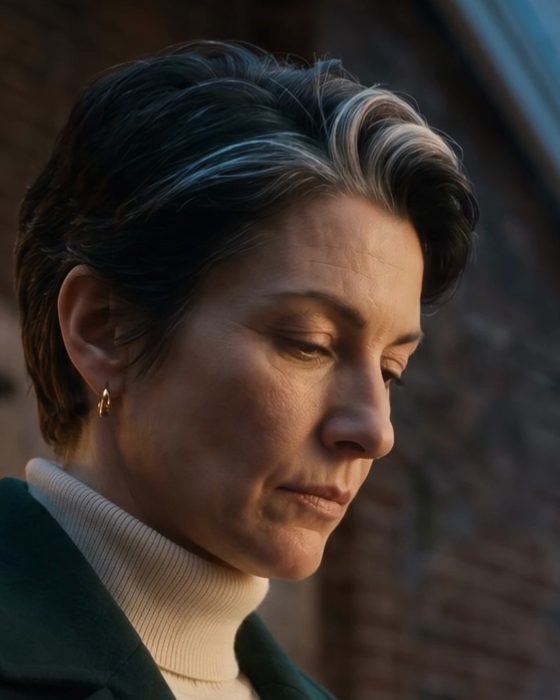
The dolly opens the scene and carries you into the room. The push-in sits on her face while she reads the note. The locked-off shot closes it: the bartender alone, dead center, and nothing moves but him.
Rules for camera prompts
1. Camera first, before the subject. Start the prompt with “Camera:” and the move, before you describe who’s in the shot or what they do. Every prompt in this scene opens that way.
2. One move, with a speed and a direction. “One very slow push-in” names the move (push-in), the speed (very slow) and, by implication, the direction (toward the subject). Add the target when it matters: “toward her face”. Don’t stack moves. If a shot really needs two, it’s probably two shots.
3. Spell out “static”. “Static camera” alone often still drifts. Write it all out: “fixed on a tripod, zero camera movement, identical framing; no zoom, no pan, no tilt.” It looks like overkill. It’s what got us a frame that didn’t move.
4. Add “no background music”. Put it in the video prompt and leave the score for the edit, where you decide where it comes in. (We built the sound for this scene separately: Sound Design for AI Film.)
5. Describe the move as one continuous thing. Both of our moving shots say “steady”, and the dolly adds “continuous” and “no cuts”. One move, start to finish, inside one clip.
Draft first, render later
We made every clip as a 480p draft with Seedance 2.5 Draft, judged only the timing, and rendered just the two we kept at 1080p. A draft is for one question: does the move and the action land at the right moment? Faces and fine detail can wait for the render.
Here’s what the close-up above cost:
- The 5-second draft at 480p: 550 credits.
- The same take rendered at 1080p: 3,200 credits, almost six times the draft. At 4K it would be 4,620.
- All six drafts for the scene together: 3,190 credits, still less than that one render.
Those are November 2026 prices: Seedance 2.5 Draft at 480p is 110 credits a second, a 1080p render 640, and 4K 924.
Up close, the difference is in the detail, not the shot. The framing, the move and her expression are the same. The render adds the texture.
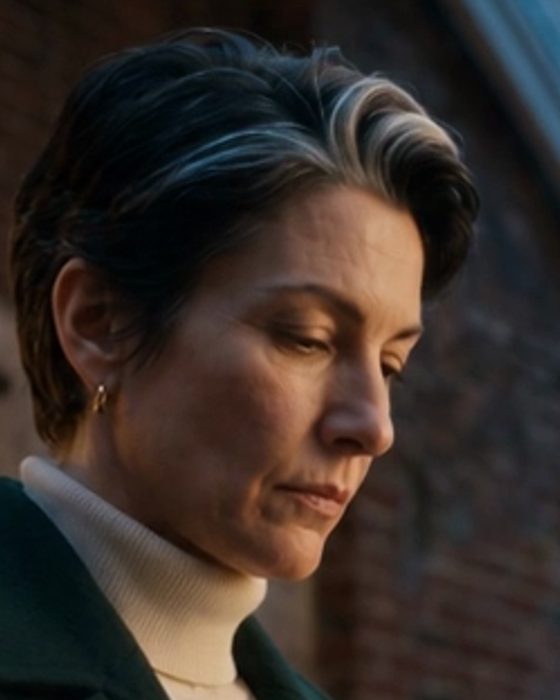
The four shots we didn’t render went into the cut as drafts. You see the cost before every generation, so you can decide take by take what’s worth the full render.
Try it
- Pick one storyboard frame and write the camera line first: one move, a speed, a direction.
- If it’s a static shot, paste the full static line instead of the word “static”.
- Generate it as a draft and judge the timing, not the detail.
- Render only the take you keep. That’s where most of your credits go.
If you haven’t storyboarded yet, start there: every shot here began as a still. How We Made a 19-Second AI Short Film Scene covers the whole scene, and What Is a Start Frame in AI Video Generation? explains why a still comes first.
Frequently asked
- How do I prompt camera movement in AI video?
Start the prompt with the camera line, before the subject, and ask for one move with a speed and a direction, such as “Camera: one very slow push-in toward her face, steady.” Asking for several moves at once usually gives you a messy shot.
- How do I get a static shot in AI video?
Spell it out: “Camera: fixed on a tripod, zero camera movement, identical framing; no zoom, no pan, no tilt.” The single word “static” often isn’t enough to stop the camera from drifting.
- What's the difference between a dolly and a push-in?
In our prompts, the dolly was a slow, continuous move forward along the bar that carries you into the room. The push-in was a very slow move toward one subject, her face, to tighten on a reaction. Both are forward moves; the target is what’s different.
- Why make an AI video draft before rendering?
A draft costs a fraction of a full render. Our 5-second draft at 480p cost 550 credits; the same take at 1080p cost 3,200. Judge the timing on the draft, then render only the takes you keep.
- Should AI video prompts include music?
Add “no background music” to video prompts and score the scene in the edit. That way you decide where music comes in, and it doesn’t change from shot to shot.
The AI tool for cinematic video.
Generate, direct, and publish professional videos, powered by the best AI models.